概述
Java是一种广泛使用的编程语言,由James 在Sun 开发,并于1995年首次发布。Java的跨平台特性使其适用于多种应用开发,包括Web开发、移动应用开发和企业级应用开发等。本文详细介绍了Java的开发环境搭建、基本语法、面向对...

Java简介:跨平台特性及开发环境搭建全解析
概述
Java是一种广泛使用的编程语言,由James 在Sun 开发,并于1995年首次发布。Java的跨平台特性使其适用于多种应用开发,包括Web开发、移动应用开发和企业级应用开发等。本文详细介绍了Java的开发环境搭建、基本语法、面向对象编程、集合框架以及异常处理和文件操作等内容,帮助读者全面掌握Java编程技能。
Java简介与开发环境搭建Java简介
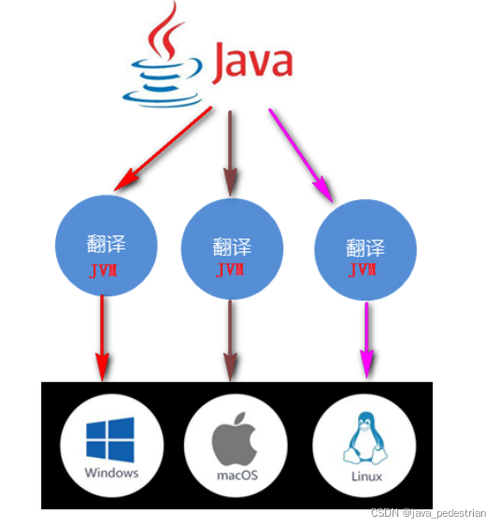
Java是一种广泛使用的编程语言,由James 在Sun 开发,并于1995年首次发布。Java的设计初衷之一是“一次编写,到处运行”(Write Once, Run , WORA),这意味着用Java编写的程序可以在任何安装了Java虚拟机(Java , JVM)的平台上运行,无需进行额外的编译。Java的这种跨平台特性使其适用于各种不同的操作系统,包括、Linux和macOS等。
Java语言主要应用于Web开发、移动应用开发(如应用)、企业级应用开发、大数据处理、云计算等。它的安全性和稳定性是Java被广泛使用的原因之一,尤其是在企业级应用中。Java拥有庞大的社区支持和技术文档,这使得学习和使用Java变得相对容易。
安装Java开发环境
下载Java开发工具包(JDK):
访问官方网站,下载对应操作系统的JDK。以下步骤适用于在操作系统上安装JDK:
安装JDK:
下载完成后,运行安装文件并按照提示完成安装。安装过程中可以选择安装路径,建议安装在非系统盘的路径,以便后续管理。
配置环境变量:
验证安装:
打开命令提示符( ),输入以下命令验证JDK是否安装成功:
java -version
javac -version
如果显示正确的版本信息,则说明安装成功。
第一个Java程序:Hello World
编写一个简单的Java程序来输出“Hello World”。
创建Java文件:
使用文本编辑器(如++、 Code等)创建一个新的文件,并将其命名为.java。
编写代码:
在.java文件中输入以下代码:
public class HelloWorld {
   public static void main(String[] args) {
       System.out.println("Hello World!");
   }
}
保存文件:
确保文件保存为.java。
编译Java代码:
打开命令提示符,切换到包含.java文件的目录,然后输入:
javac HelloWorld.java编译成功后,会在同一目录下生成一个名为.class的文件。
运行Java程序:
输入以下命令运行编译后的Java程序:
java HelloWorld运行成功后,命令提示符将显示“Hello World!”。
Java基础语法数据类型与变量
在Java中,变量用于存储数据。Java是一种强类型语言,这意味着在声明变量时必须指定其类型。
基本数据类型:
变量声明与初始化:
int age = 25; // 声明并初始化整型变量age
float salary = 5000.5f; // 声明并初始化浮点型变量salary
char grade = 'A'; // 声明并初始化字符型变量grade
boolean isStudent = true; // 声明并初始化布尔型变量isStudent
变量赋值:
变量的值可以在声明时初始化,也可以在声明后赋值。
int number;
number = 10; // 声明并赋值
number = 20; // 重新赋值
基本运算符
Java提供了多种基本运算符,用于执行数学、比较和逻辑操作。
算术运算符:
int a = 10;
int b = 5;
int sum = a + b; // 15
int difference = a - b; // 5
int product = a * b; // 50
int quotient = a / b; // 2
int remainder = a % b; // 0
关系运算符:
int x = 10;
int y = 5;
boolean isEqual = x == y; // false
boolean isGreater = x > y; // true
boolean isLess = x < y; // false
boolean isGreaterOrEqual = x >= y; // true
boolean isLessOrEqual = x <= y; // false
逻辑运算符:
boolean flag1 = true;
boolean flag2 = false;
boolean result1 = flag1 && flag2; // false
boolean result2 = flag1 || flag2; // true
boolean result3 = !flag1; // false
位运算符:
int num1 = 60; // 二进制:0011 1100
int num2 = 13; // 二进制:0000 1101
int andResult = num1 & num2; // 12,二进制:0000 1100
int orResult = num1 | num2; // 61,二进制:0011 1101
int xorResult = num1 ^ num2; // 49,二进制:0011 0001
int notResult = ~num1; // -61,二进制:1100 0011(补码)
int leftShiftResult = num1 << 2; // 240,二进制:1111 0000
int rightShiftResult = num1 >> 2; // 15,二进制:0000 1111
输入与输出
Java提供了多种方式来处理输入输出操作,其中最常用的是类和.out.print/.out.。
使用类读取输入:
import java.util.Scanner;
public class InputExample {
   public static void main(String[] args) {
       Scanner scanner = new Scanner(System.in);
       System.out.print("Enter your name: ");
       String name = scanner.nextLine();
       System.out.println("Hello, " + name);
       scanner.close();
   }
}
输出信息:
使用.out.print和.out.可以将信息输出到控制台。
public class OutputExample {
   public static void main(String[] args) {
       System.out.print("Hello, ");
       System.out.print("World!");
       System.out.println(); // 换行
       System.out.println("This is a new line.");
   }
}
流程控制条件语句
Java中使用条件语句来根据条件执行不同的代码块。主要有if语句、if-else语句和语句。
if语句:
public class IfExample {
   public static void main(String[] args) {
       int age = 20;
       if (age >= 18) {
           System.out.println("You are an adult.");
       }
   }
}
if-else语句:
public class IfElseExample {
   public static void main(String[] args) {
       int score = 85;
       if (score >= 60) {
           System.out.println("You passed.");
       } else {
           System.out.println("You failed.");
       }
   }
}
if-else if-else语句:
public class IfElseIfExample {
   public static void main(String[] args) {
       int grade = 75;
       if (grade >= 90) {
           System.out.println("Grade: A");
       } else if (grade >= 80) {
           System.out.println("Grade: B");
       } else if (grade >= 70) {
           System.out.println("Grade: C");
       } else {
           System.out.println("Grade: D");
       }
   }
}
语句:
public class SwitchExample {
   public static void main(String[] args) {
       int number = 3;
       switch (number) {
           case 1:
               System.out.println("One");
               break;
           case 2:
               System.out.println("Two");
               break;
           case 3:
               System.out.println("Three");
               break;
           default:
               System.out.println("Default");
               break;
       }
   }
}
循环语句
Java中有三种主要的循环结构:for循环、while循环和do-while循环。
for循环:
public class ForLoopExample {
   public static void main(String[] args) {
       for (int i = 1; i <= 5; i++) {
           System.out.println("Iteration: " + i);
       }
   }
}
while循环:
public class WhileLoopExample {
   public static void main(String[] args) {
       int count = 1;
       while (count <= 5) {
           System.out.println("Iteration: " + count);
           count++;
       }
   }
}
do-while循环:
public class DoWhileLoopExample {
   public static void main(String[] args) {
       int count = 1;
       do {
           System.out.println("Iteration: " + count);
           count++;
       } while (count <= 5);
   }
}
分支语句
Java中提供了break和语句来控制循环的流程。
break语句:
break语句用于立即退出循环,跳出循环体。
public class BreakExample {
   public static void main(String[] args) {
       for (int i = 1; i <= 10; i++) {
           if (i == 5) {
               break;
           }
           System.out.println("Iteration: " + i);
       }
   }
}
语句:
语句用于跳过当前循环的剩余部分,继续执行下一次循环。
public class ContinueExample {
   public static void main(String[] args) {
       for (int i = 1; i <= 10; i++) {
           if (i % 2 == 0) {
               continue;
           }
           System.out.println("Iteration: " + i);
       }
   }
}
面向对象编程类与对象
在Java中,类是对象的模板,对象是类的实例。通过定义类,可以创建具有相同属性和行为的对象。
定义类:
public class Car {
   // 成员变量
   String brand;
   int modelYear;
   String color;
   // 构造方法
   public Car(String brand, int modelYear, String color) {
       this.brand = brand;
       this.modelYear = modelYear;
       this.color = color;
   }
   // 成员方法
   public void startEngine() {
       System.out.println("The engine is starting.");
   }
   public void stopEngine() {
       System.out.println("The engine is stopping.");
   }
}
创建对象:
public class CarExample {
   public static void main(String[] args) {
       Car myCar = new Car("Toyota", 2020, "Blue");
       myCar.startEngine();
       myCar.stopEngine();
   }
}
继承与多态
继承允许一个类继承另一个类的行为和属性,多态则允许对象在运行时根据具体情况表现出不同的行为。
继承:
public class Animal {
   String name;
   int age;
   public Animal(String name, int age) {
       this.name = name;
       this.age = age;
   }
   public void makeSound() {
       System.out.println("The animal makes a sound.");
   }
}
public class Dog extends Animal {
   public Dog(String name, int age) {
       super(name, age);
   }
   @Override
   public void makeSound() {
       System.out.println("The dog barks.");
   }
}
public class InheritanceExample {
   public static void main(String[] args) {
       Animal myAnimal = new Animal("Generic Animal", 5);
       Animal myDog = new Dog("Buddy", 3);
       myAnimal.makeSound();
       myDog.makeSound();
   }
}
多态:
public class Animal {
String name;
int age;
public Animal(String name, int age) {
this.name = name;
this.age = age;
}
public void makeSound() {
System.out.println("The animal makes a sound.");
}
}
public class Dog extends Animal {
public Dog(String name, int age) {
super(name, age);
}
@Override
public void makeSound() {
System.out.println("The dog barks.");
}
}
public class Cat extends Animal {
public Cat(String name, int age) {
super(name, age);
}
@Override
public void makeSound() {
System.out.println("The cat meows.");
}
}
public class PolymorphismExample {
public static void main(String[] args) {
Animal myDog = new Dog("Buddy", 3);
Animal myCat = new Cat("Whiskers", 5);
myDog.makeSound();
myCat.makeSound();
}
}封装与抽象
封装是指将数据(属性)和操作数据的方法组合在一起,使其成为一个整体,并通过公共接口访问这些数据。抽象则是将复杂的问题分解成更简单、更易于理解和处理的部分。
封装:
public class Employee {
   private String name;
   private int age;
   private double salary;
   public Employee(String name, int age, double salary) {
       this.name = name;
       this.age = age;
       this.salary = salary;
   }
   public String getName() {
       return name;
   }
   public void setName(String name) {
       this.name = name;
   }
   public int getAge() {
       return age;
   }
   public void setAge(int age) {
       this.age = age;
   }
   public double getSalary() {
       return salary;
   }
   public void setSalary(double salary) {
       this.salary = salary;
   }
}
public class EncapsulationExample {
   public static void main(String[] args) {
       Employee employee = new Employee("John Doe", 30, 50000);
       System.out.println("Name: " + employee.getName());
       employee.setAge(31);
       System.out.println("Age: " + employee.getAge());
       employee.setSalary(55000);
       System.out.println("Salary: " + employee.getSalary());
   }
}
抽象:
public abstract class Vehicle {
   public abstract void startEngine();
   public abstract void stopEngine();
}
public class Car extends Vehicle {
   @Override
   public void startEngine() {
       System.out.println("The car engine is starting.");
   }
   @Override
   public void stopEngine() {
       System.out.println("The car engine is stopping.");
   }
}
public class AbstractExample {
   public static void main(String[] args) {
       Vehicle myCar = new Car();
       myCar.startEngine();
       myCar.stopEngine();
   }
}
集合框架与常用类与
和都是Java中的集合类,用于存储一组元素。基于数组实现,而基于双向链表实现。
:
import java.util.ArrayList;
import java.util.List;
public class ArrayListExample {
   public static void main(String[] args) {
       List list = new ArrayList<>();
       list.add("Apple");
       list.add("Banana");
       list.add("Cherry");
       list.add("Date");
       for (String fruit : list) {
           System.out.println(fruit);
       }
       list.remove("Banana");
       System.out.println("After removing 'Banana':");
       for (String fruit : list) {
           System.out.println(fruit);
       }
   }
}
:
import java.util.LinkedList;
import java.util.List;
public class LinkedListExample {
   public static void main(String[] args) {
       List list = new LinkedList<>();
       list.add("Apple");
       list.add("Banana");
       list.add("Cherry");
       list.add("Date");
       for (String fruit : list) {
           System.out.println(fruit);
       }
       list.remove("Banana");
       System.out.println("After removing 'Banana':");
       for (String fruit : list) {
           System.out.println(fruit);
       }
   }
}
与
和是Java集合框架中的重要成员,用于存储键值对或简单的元素集合。
:
import java.util.HashMap;
public class HashMapExample {
   public static void main(String[] args) {
       HashMap map = new HashMap<>();
       map.put("Apple", 5);
       map.put("Banana", 10);
       map.put("Cherry", 15);
       for (String key : map.keySet()) {
           System.out.println(key + ": " + map.get(key));
       }
       map.remove("Banana");
       System.out.println("After removing 'Banana':");
       for (String key : map.keySet()) {
           System.out.println(key + ": " + map.get(key));
       }
   }
}
:
import java.util.HashSet;
public class HashSetExample {
   public static void main(String[] args) {
       HashSet set = new HashSet<>();
       set.add("Apple");
       set.add("Banana");
       set.add("Cherry");
       set.add("Date");
       for (String fruit : set) {
           System.out.println(fruit);
       }
       set.remove("Banana");
       System.out.println("After removing 'Banana':");
       for (String fruit : set) {
           System.out.println(fruit);
       }
   }
}
常用工具类:与Date
Java提供了丰富的工具类,如和Date,用于处理字符串和日期时间。
:
public class StringExample {
   public static void main(String[] args) {
       String str = "Hello, Java!";
       System.out.println(str);
       String newStr = str.replace("Java", "World");
       System.out.println(newStr);
       String upperStr = str.toUpperCase();
       System.out.println(upperStr);
       String lowerStr = str.toLowerCase();
       System.out.println(lowerStr);
       boolean startsWithJava = str.startsWith("Hello");
       System.out.println(startsWithJava);
       boolean endsWithJava = str.endsWith("Java");
       System.out.println(endsWithJava);
       String[] splitStr = str.split(",");
       for (String s : splitStr) {
           System.out.println(s);
       }
   }
}
Date:
import java.util.Date;
public class DateExample {
   public static void main(String[] args) {
       Date currentDate = new Date();
       System.out.println("Current date and time: " + currentDate);
       // 获取一周的第一天
       int dayOfWeek = currentDate.getDay();
       System.out.println("Day of week: " + dayOfWeek);
       // 获取一个月中的第一天
       int dayOfMonth = currentDate.getDate();
       System.out.println("Day of month: " + dayOfMonth);
       // 获取年份
       int year = currentDate.getYear();
       System.out.println("Year: " + year);
       // 格式化日期
       String formattedDate = currentDate.toString();
       System.out.println("Formatted date: " + formattedDate);
   }
}
异常处理与文件操作异常处理机制
Java中的异常处理机制允许程序在发生错误时捕获并处理异常。
捕获异常:
public class ExceptionExample {
   public static void main(String[] args) {
       try {
           int result = 10 / 0;
           System.out.println("Result: " + result);
       } catch (ArithmeticException e) {
           System.out.println("ArithmeticException caught: " + e.getMessage());
       } finally {
           System.out.println("Finally block executed.");
       }
   }
}
抛出异常:
public class CustomExceptionExample {
   public static void main(String[] args) {
       try {
           throw new RuntimeException("Custom exception");
       } catch (RuntimeException e) {
           System.out.println("RuntimeException caught: " + e.getMessage());
       }
   }
}
文件读写操作
Java提供了丰富的API来处理文件读写操作。
文件读取:
import java.io.BufferedReader;
import java.io.FileReader;
import java.io.IOException;
public class FileReadExample {
   public static void main(String[] args) {
       try (BufferedReader br = new BufferedReader(new FileReader("example.txt"))) {
           String line;
           while ((line = br.readLine()) != null) {
               System.out.println(line);
           }
       } catch (IOException e) {
           System.out.println("An error occurred while reading the file: " + e.getMessage());
       }
   }
}
文件写入:
import java.io.FileWriter;
import java.io.IOException;
public class FileWriteExample {
   public static void main(String[] args) {
       try (FileWriter writer = new FileWriter("example.txt")) {
           writer.write("Hello, World!\n");
           writer.write("This is an example.\n");
           writer.flush();
       } catch (IOException e) {
           System.out.println("An error occurred while writing to the file: " + e.getMessage());
       }
   }
}
资源管理与关闭
Java提供了try-with-语句来自动关闭资源,避免手动关闭资源时可能产生的问题。
使用try-with-:
import java.io.BufferedReader;
import java.io.FileReader;
public class TryWithResourcesExample {
   public static void main(String[] args) {
       try (BufferedReader br = new BufferedReader(new FileReader("example.txt"))) {
           String line;
           while ((line = br.readLine()) != null) {
               System.out.println(line);
           }
       } catch (IOException e) {
           System.out.println("An error occurred while reading the file: " + e.getMessage());
       }
   }
}
通过上述内容,读者可以对Java的基本概念、语法和常见功能有一个全面的理解,并能够在实际项目中应用这些知识。
public System.out.println String int Java void
热门文章
-

杭州文海实验多名学生流鼻血,官方连夜成立联合工作组彻查工厂排放
-

万茜颜值进阶史:从青涩到“清冷系天花板”的蜕变之路
-

杨少华遗体告别仪式:亲友送别,赵本山送花圈,杨威杨议忙后事
-

长江商学院自创办第一天起 始终以为中国和世界培养一批具有全球视野
-

深圳南山区“美澳口腔”诊所“跑路”风波:数百患者维权,交款种牙却陷入困境
-

“超级工程”渐行渐近,重庆破局,宜昌“躺赢”?
-

国务院总理李强在天津出席2025年夏季达沃斯论坛工商界代表座谈会
-
电脑恢复出厂设置步骤详解:备份数据及各操作要点
-

首份2025年中报周二亮相,12家公司净利润预增超10倍,华银电力暂居榜首
-

十三岁的星辰:云南女孩侯静怡短暂而明亮的一生
-

广州英华思力足球俱乐部翻译徐进遭日籍教练霸凌猝死,家属讨公道
-

巨子生物“变卦”背后:胶原蛋白检测风波与医美巨头商战
最近发表
-

张国立姜文甄子丹前妻曝光:明星家庭背后不为人知的辛酸
-

张国立姜文甄子丹前妻曝光:儿子是污点,干女儿争光
-

中国钢铁股票代码601005 重庆钢铁获宝武集团批复
-

网购怀孕B超单骗婚案曝光,定制逼真报告单竟如此简单?
-

AI预测胎儿长相服务走红,怀孕24周四维彩超图成关键
-

春季火灾防控:渝消蓝盾讲师团深入多地开展安全培训
-
电路板上key是什么意思?一篇文章看懂按键模块作用
-

论文数据出错别慌,联系编辑这样改最稳妥
-

张国立演艺路坎坷却总能逢凶化吉,生活中却有憋屈难题
-
如何让服务器自动下载网页图片并替换链接,超简单三步搞定
-

中科创投昆仑(新疆)能源有限公司何时上市及业务范围
-

钢铁股代码大全:88家上市公司名单一览