简介
快乐在满足中求,烦恼多从欲中来
记录程序的点点滴滴。
输入一个网址从这个网址中解析出图片,并将它保存在本地
流程图
程序分析
解析主网址
def get_urls():
url = 'http://www.nipic.com/s...

记录程序点滴:解析网址图片保存本地及相关设置说明?
简介
快乐在满足中求,烦恼多从欲中来
记录程序的点点滴滴。
输入一个网址从这个网址中解析出图片,并将它保存在本地
流程图
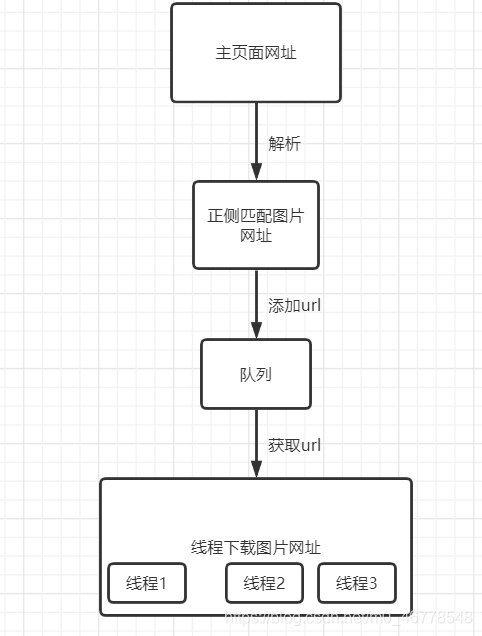
程序分析
解析主网址
def get_urls():
 url = 'http://www.nipic.com/show/35350678.html' # 主网址
 pattern = "(http.*?jpg)"
 header = {
'user-agent': 'Mozilla/5.0 (Windows NT 10.0; Win64; x64) AppleWebKit/537.36 (KHTML, like Gecko) Chrome/88.0.4324.182 Safari/537.36'
 }
 r = requests.get(url,headers=header)
 r.encoding = r.apparent_encoding
 html = r.text
 urls = re.findall(pattern,html)
 return urls
url 为需要爬的主网址
为正则匹配
设置请求头
r = .get(url,=) 发送请求
r. = r. 设置编码格式,防止出现乱码
属性说明
r.
从http 中提取响应内容编码
r.
从内容中分析出的响应内容编码
urls = re.(,html) 进行正则匹配
re.(, , flags=0)
正则 re. 的简单用法(返回中所有与相匹配的全部字串,返回形式为数组)
下载图片并存储
def download(url_queue: queue.Queue()):
 while True:
  url = url_queue.get()
  root_path = 'F:\\1\\' # 图片存放的文件夹位置
  file_path = root_path + url.split('/')[-1] #图片存放的具体位置
  try:
if not os.path.exists(root_path): # 判断文件夹是是否存在,不存在则创建一个
 os.makedirs(root_path)
if not os.path.exists(file_path): # 判断文件是否已存在
 r = requests.get(url)
 with open(file_path,'wb') as f:
  f.write(r.content)
  f.close()
  print('图片保存成功')
else:
 print('图片已经存在')
  except Exception as e:
print(e)
  print('线程名: ', threading.current_thread().name,"url_queue.size=", url_queue.qsize())
此函数需要传一个参数为队列
queue模块中提供了同步的、线程安全的队列类,queue.Queue()为一种先入先出的数据类型,队列实现了锁原语,能够在多线程中直接使用。可以使用队列来实现线程间的同步。
: queue.Queue() 这是一个队列类型的数据,是用来存储图片URL
url = .get() 从队列中取出一个url
.qsize() 返回队形内元素个数
全部代码
import requests
import re
import os
import threading
import queue
def get_urls():
 url = 'http://www.nipic.com/show/35350678.html' # 主网址
 pattern = "(http.*?jpg)"
 header = {
'user-agent': 'Mozilla/5.0 (Windows NT 10.0; Win64; x64) AppleWebKit/537.36 (KHTML, like Gecko) Chrome/88.0.4324.182 Safari/537.36'
 }
 r = requests.get(url,headers=header)
 r.encoding = r.apparent_encoding
 html = r.text
 urls = re.findall(pattern,html)
 return urls
def download(url_queue: queue.Queue()):
 while True:
  url = url_queue.get()
  root_path = 'F:\\1\\' # 图片存放的文件夹位置
  file_path = root_path + url.split('/')[-1] #图片存放的具体位置
  try:
if not os.path.exists(root_path):
 os.makedirs(root_path)
if not os.path.exists(file_path):
 r = requests.get(url)
 with open(file_path,'wb') as f:
  f.write(r.content)
  f.close()
  print('图片保存成功')
else:
 print('图片已经存在')
  except Exception as e:
print(e)
  print('线程名:', threading.current_thread().name,"图片剩余:", url_queue.qsize())
if __name__ == "__main__":
	url_queue = queue.Queue()
	urls = tuple(get_urls())
	for i in urls:
	 url_queue.put(i)
	t1 = threading.Thread(target=download,args=(url_queue,),name="craw{}".format('1'))
	t2 = threading.Thread(target=download,args=(url_queue,),name="craw{}".format('2'))

	t1.start()
	t2.start()
到此这篇关于 爬取网页图片详解流程的文章就介绍到这了,更多相关 爬取网页图片内容请搜索本站以前的文章或继续浏览下面的相关文章希望大家以后多多支持本站!
url path 图片 urls print root
热门文章
-

杭州文海实验多名学生流鼻血,官方连夜成立联合工作组彻查工厂排放
-

万茜颜值进阶史:从青涩到“清冷系天花板”的蜕变之路
-

杨少华遗体告别仪式:亲友送别,赵本山送花圈,杨威杨议忙后事
-

长江商学院自创办第一天起 始终以为中国和世界培养一批具有全球视野
-

深圳南山区“美澳口腔”诊所“跑路”风波:数百患者维权,交款种牙却陷入困境
-

“超级工程”渐行渐近,重庆破局,宜昌“躺赢”?
-

国务院总理李强在天津出席2025年夏季达沃斯论坛工商界代表座谈会
-
电脑恢复出厂设置步骤详解:备份数据及各操作要点
-

首份2025年中报周二亮相,12家公司净利润预增超10倍,华银电力暂居榜首
-
十三岁的星辰:云南女孩侯静怡短暂而明亮的一生
-

广州英华思力足球俱乐部翻译徐进遭日籍教练霸凌猝死,家属讨公道
-

巨子生物“变卦”背后:胶原蛋白检测风波与医美巨头商战
最近发表
-

张国立姜文甄子丹前妻曝光:明星家庭背后不为人知的辛酸
-

张国立姜文甄子丹前妻曝光:儿子是污点,干女儿争光
-
中国钢铁股票代码601005 重庆钢铁获宝武集团批复
-

网购怀孕B超单骗婚案曝光,定制逼真报告单竟如此简单?
-
AI预测胎儿长相服务走红,怀孕24周四维彩超图成关键
-

春季火灾防控:渝消蓝盾讲师团深入多地开展安全培训
-
电路板上key是什么意思?一篇文章看懂按键模块作用
-

论文数据出错别慌,联系编辑这样改最稳妥
-

张国立演艺路坎坷却总能逢凶化吉,生活中却有憋屈难题
-
如何让服务器自动下载网页图片并替换链接,超简单三步搞定
-
中科创投昆仑(新疆)能源有限公司何时上市及业务范围
-

钢铁股代码大全:88家上市公司名单一览